
Editing Game Data at Runtime with Frida
What is Frida
Frida is a dynamic instrumentation toolkit that lets you inspect and modify the behavior of a running application, without changing its binaries. It works by injecting a JavaScript runtime into a target process, allowing you to execute custom scripts while the application is running.
Unlike static analysis, where you examine code without executing it, Frida gives you live access to an application’s execution. This makes it an invaluable tool for reverse engineering, security research, malware analysis, and debugging.
With Frida you could:
- Read and overwrite variables while the app is running
- Intercept function calls and change their behavior, arguments, or return values
- Call functions that were never meant to be called from outside the app
- Watch execution happen in real time, rather than guessing from a static disassembly
In short, Frida allows you to interact with software while it’s running This makes it possible to observe, test, and manipulate behavior that would otherwise be difficult or impossible to analyze through static inspection alone.
How Frida Talks to Java Code
Android apps are compiled to run on the Android Runtime (ART), and most app logic is written in Java or Kotlin, both of which compile down to the same bytecode. Frida ships with a Java bridge specifically for interacting with this layer. A few functions that come up constantly are:
Java.perform(fn) wraps any code that touches the Java runtime. Frida attaches to a process asynchronously, so this makes sure the Java bridge is fully initialized before your code tries to use it.
Java.use(className) gives you a handle to a class definition itself. This is useful when you want to hook a method on that class or create a new instance.
Java.choose(className, callbacks) scans the live heap for objects that are actual running instances of a class. This is the one you reach for when you need to touch an object that already exists.
Data Edits vs. Logic Edits
Once you’re inside a running application there are two fundamentally different ways to change its behavior: modifying data or modifying logic.
Editing Data
A data edit changes a value that already exists in memory without changing the code that uses it. For example, you might modify a player’s health, currency balance, or a boolean flag that controls whether a feature is enabled.
The application’s code continues to execute exactly as written and it simply operates on different data.
Editing Logic
A logic edit changes what the application actually does. Instead of modifying a value, you hook a method and replace or alter its implementation. When the application calls that method your code runs instead of (or in addition to) the original implementation.
This is Frida’s greatest strength. Rather than nudging values in memory you can rewrite the application’s behavior while it’s running.
For example, bypassing a root or jailbreak detection routine usually isn’t a data edit. Instead, you hook the detection method and force it to always return false, making the application believe the device is not rooted regardless of what the original code would have reported.
In practice you’ll often use both techniques together. You might modify data to test different application states while also hooking methods to bypass security checks or observe internal behavior.
A Simple Game Example
I built a small Android game called “coin game” specifically to demonstrate the use of Frida. The game is intentionally simple. The player must collect ten coins to win the game, but the player can only collect eight through normal gameplay. The remaining two coins are unreachable unless something modifies the application’s state at runtime.
The game itself isn’t important. It’s a stand-in for a common real-world scenario for an application that stores its state in memory that cannot normally be changed through the user interface but can be modified through runtime instrumentation.
Here’s the actual game logic, in full, written in Kotlin:
package com.example.coingame

import android.os.Bundle
import android.widget.Button
import android.widget.TextView
import androidx.appcompat.app.AppCompatActivity
class MainActivity : AppCompatActivity() {
    private var coinCount: Int = 0
    private val maxCoinsAvailable = 8
    private val coinsToWin = 10
    private lateinit var coinCountText: TextView
    private lateinit var statusText: TextView
    private lateinit var collectButton: Button
    override fun onCreate(savedInstanceState: Bundle?) {
        super.onCreate(savedInstanceState)
        setContentView(R.layout.activity_main)

        coinCountText = findViewById(R.id.coinCountText)
        statusText = findViewById(R.id.statusText)
        collectButton = findViewById(R.id.collectButton)
        val claimButton = findViewById<Button>(R.id.claimButton)

        updateUI()

        collectButton.setOnClickListener { collectCoin() }
        claimButton.setOnClickListener { checkWin() }
    }

    private fun collectCoin() {
        if (coinCount < maxCoinsAvailable) { coinCount++ updateUI() } if (coinCount >= maxCoinsAvailable) {
            collectButton.isEnabled = false
        }
    }
    private fun checkWin() {
        if (coinCount >= coinsToWin) {
            statusText.text = "YOU WIN! Collected $coinCount coins!"
        } else {
            statusText.text = "Not enough coins. You have $coinCount, need $coinsToWin."
        }
    }


    private fun updateUI() {
        coinCountText.text = "Coins: $coinCount / $maxCoinsAvailable available"
    }
}
Walking through the code, collectCoin() is the only legitimate way for the player to increase coinCount, and it stops incrementing once maxCoinsAvailable (eight) is reached. When the player presses the Claim button, checkWin() verifies whether coinCount is at least coinsToWin (ten). Since normal gameplay never allows more than eight coins the win condition is impossible to satisfy without modifying the application’s runtime state.
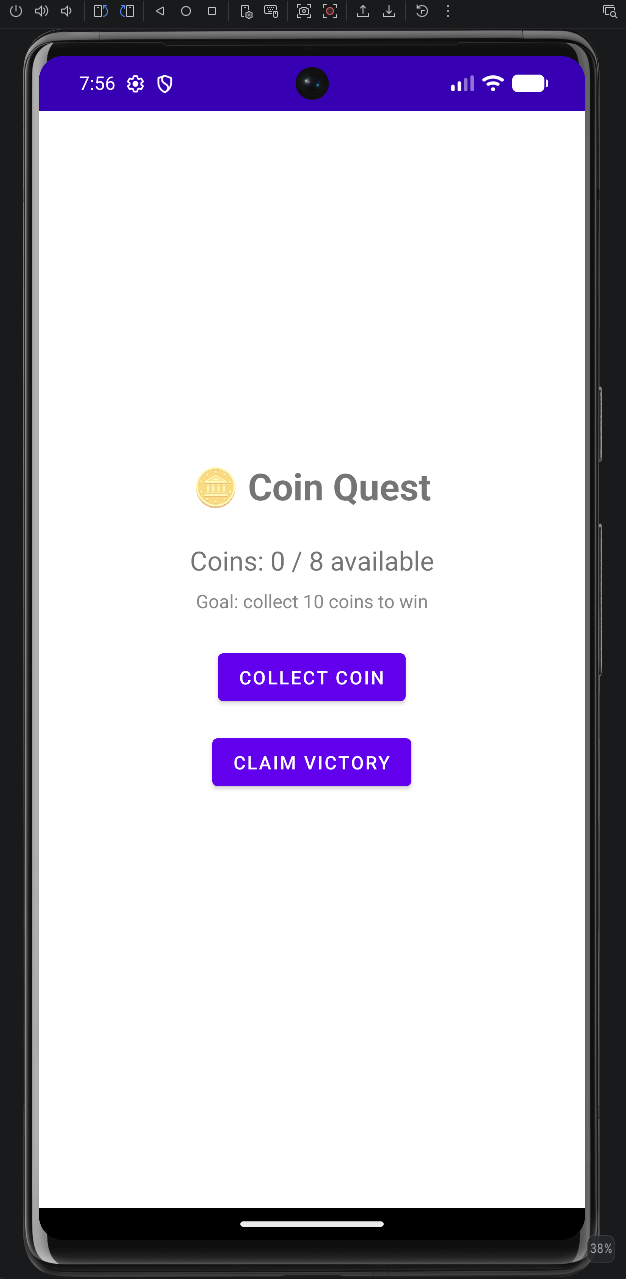
Here is how the game looks running in Android Studio on an emulator.
JADX
In a real-world engagement this is the kind of output JADX provides: it decompiles a compiled APK into readable source-like Java code without requiring access to the original source. Looking at MainActivity, JADX reconstructed the coinCount, maxCoinsAvailable, and coinsToWin fields along with the logic inside collectCoin(), checkWin(), and updateUI(). While the decompiled code isn’t guaranteed to be identical to the original source, it is often close enough to understand the application’s behavior and control flow.
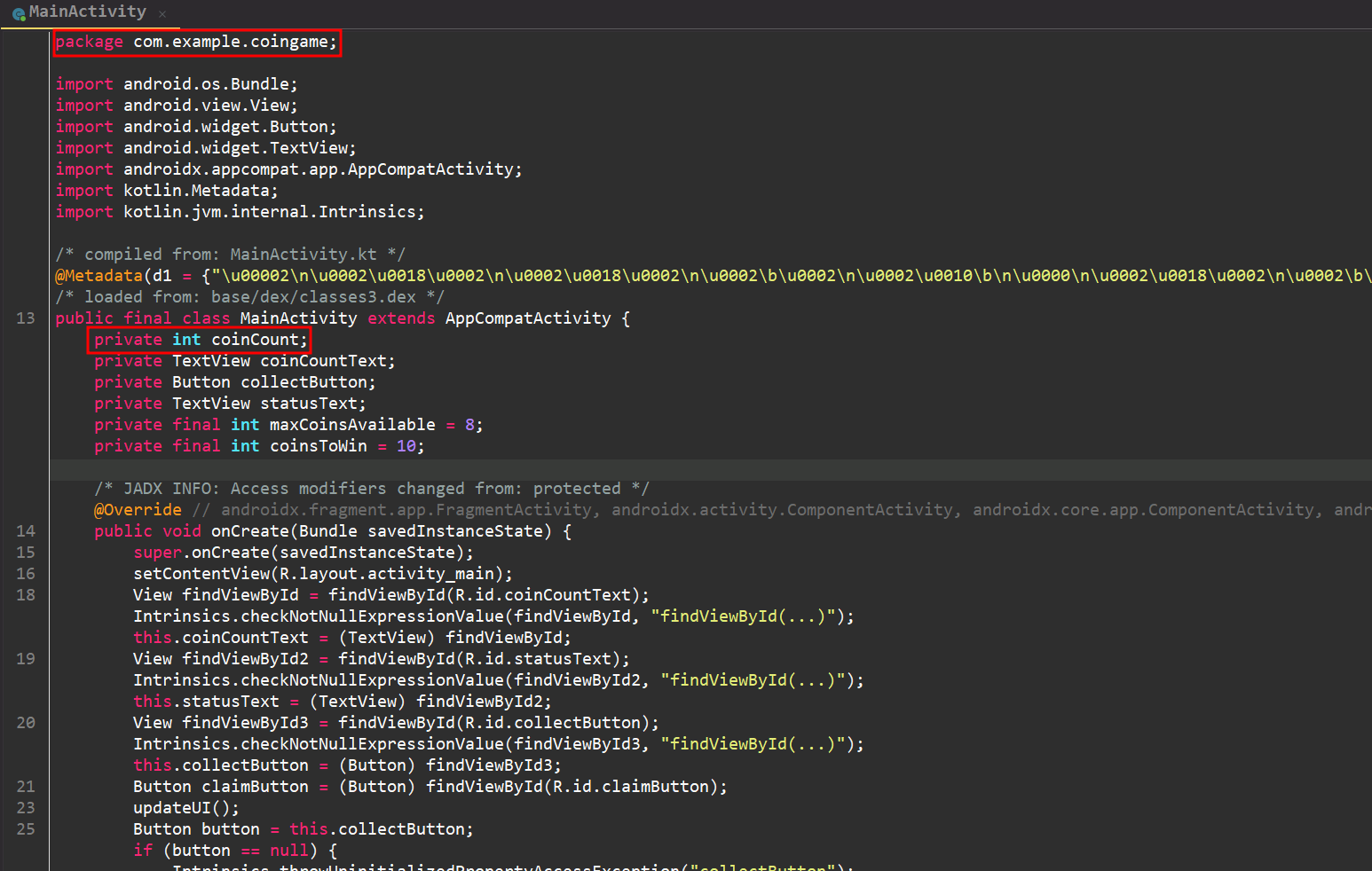
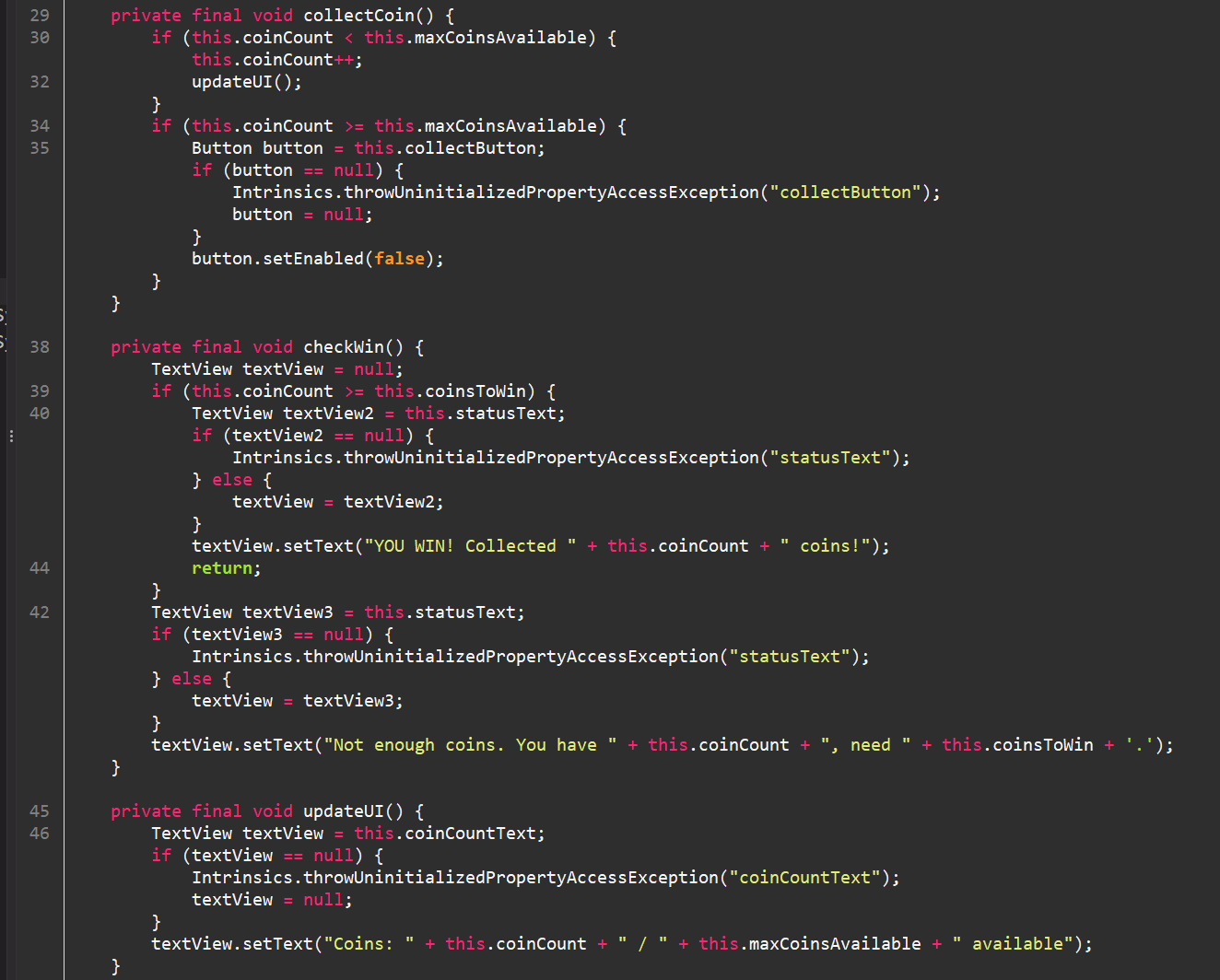
This is where JADX becomes important during an assessment. Before touching Frida or any other dynamic tooling JADX lets you build a mental map of the application’s logic through static analysis.
Now we can get to the Frida script that will update the game data at runtime.
The Frida Script
The script performs a runtime data edit in three steps: it locates the live instance of the game’s MainActivity, overwrites the coinCount field directly in memory, and then safely refreshes the UI on the Android main thread so the updated value is immediately visible on screen.
// Waits for Frida's Java bridge to be ready before running Java code.
Java.perform(function () {
    // Finds live instances of MainActivity currently present in the Java heap.
    Java.choose("com.example.coingame.MainActivity", {
        // Runs once for each matching instance found in memory.
        onMatch: function (instance) {
            console.log("[*] Found MainActivity instance");
            console.log("[*] Current coinCount: " + instance.coinCount.value);
            instance.coinCount.value = 10;
            console.log("[+] coinCount set to: " + instance.coinCount.value);
            // Executes code on the Android main (UI) thread to safely interact with UI components.
            Java.scheduleOnMainThread(function () {
                instance.updateUI();
                console.log("[+] updateUI() called — UI refresh triggered");
            });
        },
        // Called after all matching instances have been processed.
        onComplete: function () {
            console.log("[+] Script has completed.");
        }
    });
});
Here’s what’s actually happening in the script.
The script starts by wrapping everything inside Java.perform(). This ensures the Android Runtime (ART) and Frida’s Java bridge are fully initialized before attempting to interact with any Java classes.
Next Java.choose() searches the Java heap for a live instance of MainActivity. This is an important distinction is the script isn’t creating a new activity. It’s locating the one Android has already created and is currently using. Once Frida finds that object it passes it to the onMatch() callback as instance.
From there the script reads the current value of coinCount, logs it to the console, and then overwrites the field directly in memory by setting it to 10. At this point the application’s state has changed, but the user interface hasn’t been updated yet.
To make the change visible the script schedules a call to updateUI() on Android’s main (UI) thread using Java.scheduleOnMainThread(). Android requires UI operations to run on the main thread, so this ensures the interface refreshes safely and immediately reflects the modified value.
Finally, after Java.choose() has finished scanning the heap, the onComplete() callback runs and prints a message indicating the script has finished executing.
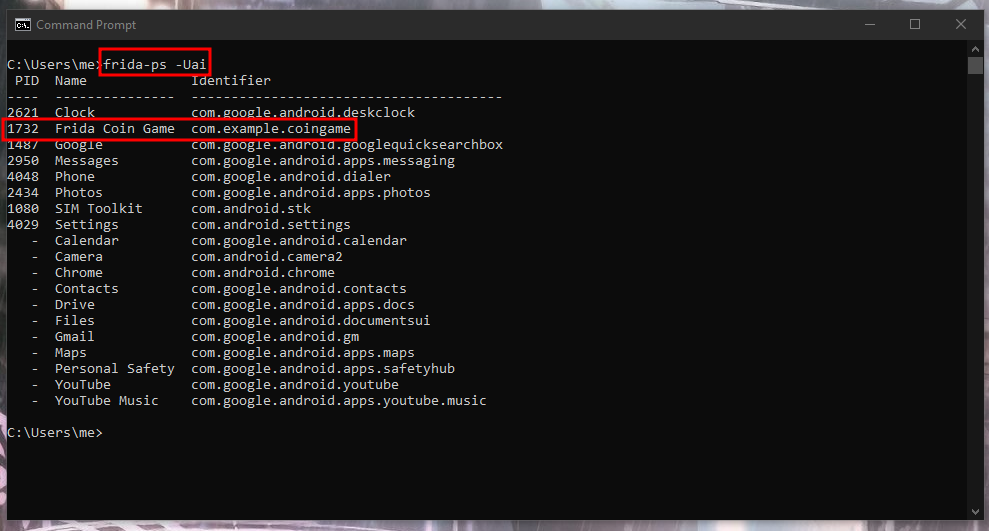
The screenshot below shows every process Frida can attach to. Using frida-ps -Uai shows the list of installed applications.
Note the PID 1732 for the process ID of the application running on the device.
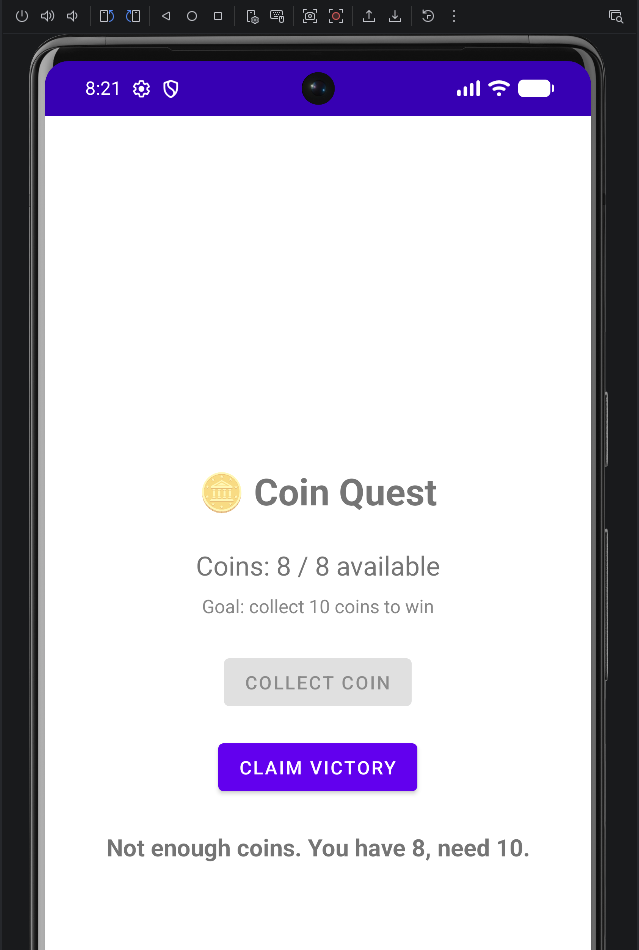
The screenshot below shows are game running with eight coins used, so we are out of available coins.
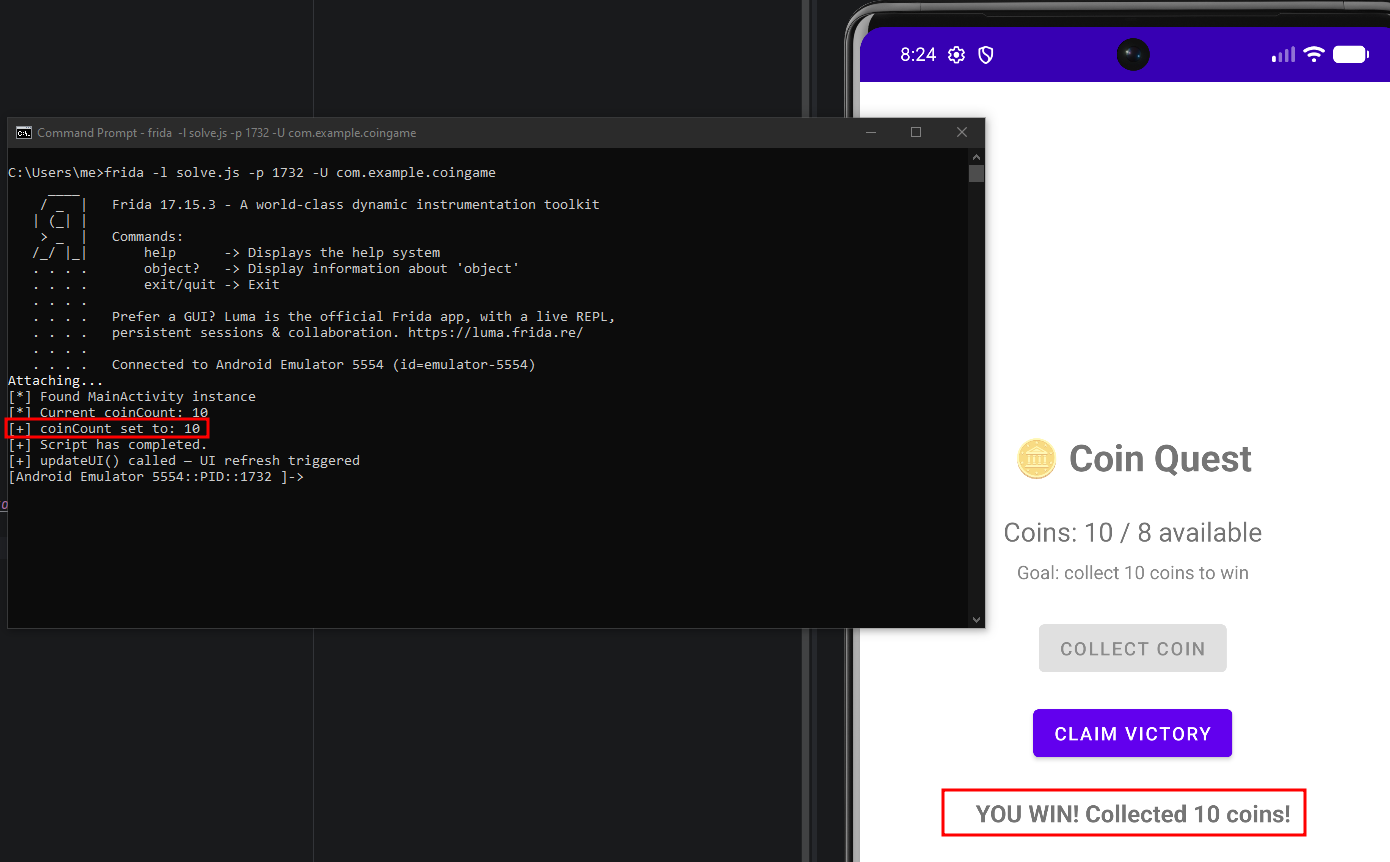
Using frida -l solve.js -p 1732 -U com.example.coingame we can attach to the game. As shown in the figure below, we have successfully updated coinCount to 10, along with the “YOU WIN! Collected 10 coins!” message now displayed in the UI.
Although this example is intentionally simple, it demonstrates the same workflow used during Android security assessments. Static analysis with JADX identifies interesting application state, while Frida provides the ability to inspect and modify that state at runtime.
This concludes the write up on Editing Game Data at Runtime with Frida. I hope you found value in this content. Let me know if you have any questions and thank you for reading! <3
References:
https://frida.re/docs/examples/android/